Showing posts with label phonon. Show all posts

Saturday, October 15, 2011

Audiobook Reader now available for N9 / N950 ( Harmattan ) on Nokia Store

I recently updated my Audiobook reader application for N9 Harmattan platform. It is also supported on N950. You can download it from Nokia Store from here.


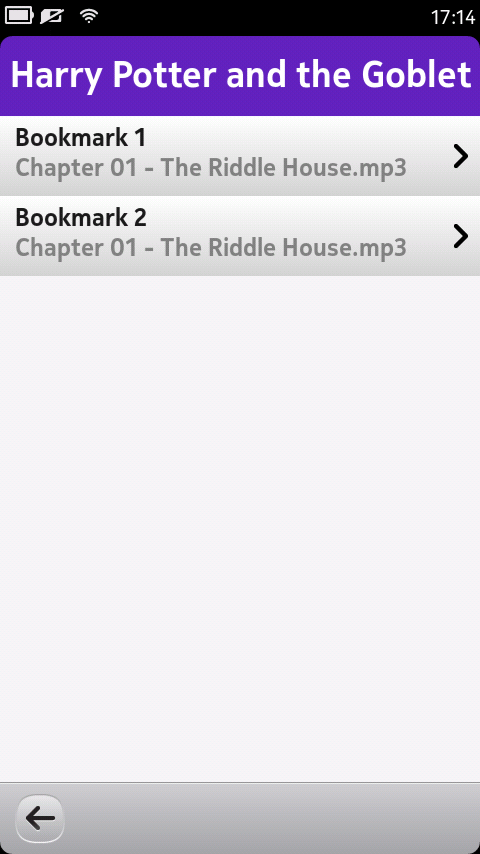
For those who dont know about this application, Audiobook reader is simple Audiobook player which lets you add audiobook with single large audio file or folder with audio files for each chapter. It automatically bookmark the last position of audiobook and resume playback from that position. It also allow to add custom bookmark and playback from certain chapter from Audiobook.

For N9, I completely reimplemented UI layer to give native look and feel. For this version I am also showing book cover image, downloaded from AWS to give more feel of book.


Same as N900 version, this version also support custom bookmark support and chapter selection support. Volume can be changed by using Hardware key.


Saturday, August 27, 2011

Using Phonon Video player from QML

Recently one of my friend asked me to give some sample code for integrating Phonon Video Player to QML. Long back I had created a application which download video from dailymotion and play the video using Phonon.

QtMultimediaKit provides QML Video element which we cause use for playing video. But form reason if you need to use your exiting code then you can follow what I did.

I tried to my video widget from that application with sample QML application. I was able to integrate that widget quite easily without any problem.

Following is sample code for video player that uses the Phonon VideoPlayer to play video.

#include <phonon/videoplayer.h>
#include <QUrl>

Widget::Widget(QWidget *parent)
    : QWidget(parent)
{    
    player = new Phonon::VideoPlayer(Phonon::VideoCategory, this);

    QVBoxLayout* mainLayout = new QVBoxLayout(this);
    mainLayout->setMargin(0);
    mainLayout->addWidget( player);
}

void Widget::play()
{
    if( player->isPlaying() == false )
        player->play(QUrl("URL FOR VIDEO"));
}
Then I created an custom QDeclarativeItem, which uses my video widget class through QGraphicsProxyWidget. Visit my post for more information how we can use this class into QML.
#include "qmlvideo.h"
#include <QGraphicsProxyWidget>

#include "widget.h"

QmlVideo::QmlVideo(QDeclarativeItem *parent) :
    QDeclarativeItem(parent)
{
    myVideoWidget = new Widget;
    QGraphicsProxyWidget* proxy = new QGraphicsProxyWidget(this);
    proxy->setWidget(myVideoWidget);
}


void QmlVideo::play()
{
    myVideoWidget->play();
}
Now finally I created QML file which uses above created declarative item. I also tried how we can put player control with video player. Following is final code with some unnecessary code removed.
import QtQuick 1.0
import qmlVideo 1.0

Rectangle {
    width: 624 ; height: 480
    QmlVideo{
        id:videoPlayer
    }

    Item{
        anchors.bottom: parent.bottom
        anchors.horizontalCenter: parent.horizontalCenter
        width: playerControl.width
        height: playerControl.height
        MouseArea{
            id:mouseArea
            anchors.fill: parent
            hoverEnabled:true

            onEntered: {
                playerControl.opacity = 1
            }

            onExited: {
                playerControl.opacity = 0
            }
        }
    }

    Rectangle{
        width: 200
        height: 50
        anchors.bottom: parent.bottom
        anchors.horizontalCenter: parent.horizontalCenter
        id:playerControl
        color: "gray"
        opacity: 0
        radius:10

        Row{
            anchors.horizontalCenter: parent.horizontalCenter
            anchors.verticalCenter: parent.verticalCenter
            spacing: 20

            Button{
                icon: "backward.png"
                iconOn:"backward_on.png"
                onClicked: {
                    videoPlayer.backward();
                }
            }
        }

        Behavior on opacity {
            NumberAnimation { duration: 500 }
        }
    }
}
Following is output and here is link to source code.Hope it will be useful to someone.

Saturday, April 9, 2011

Playing sound with Qt and Phonon

In games generally we need to play small sound clips. For Qt program in such case I prefer to use Phonon module.

Following is simple sample code that plays sound clips on button click event.

In constructor I am creating media object and audio output. MediaObject class provides playback interface, AudioOutput send audio data to output device and by createPath method call we are creating connection of media object to audio output.

Then in playSound method I am setting sound file which needs to be played by calling setCurrentSource api and providing path of sound file. Finally by calling play API on media object i am playing sound file.

SoundWidget::SoundWidget(QWidget *parent) :
    QWidget(parent) 
{
    QVBoxLayout* main = new QVBoxLayout(this);
    QPushButton* btn = new QPushButton("Play Sound");
    connect(btn,SIGNAL(clicked()),this,SLOT(playSound()));
    main->addWidget(btn);

    mMediaObject = new Phonon::MediaObject(this);
    mAudioOutput = new Phonon::AudioOutput(Phonon::MusicCategory, this);
    mAudioOutput->setVolume(0.5);

    Phonon::createPath(mMediaObject, mAudioOutput);
}

void SoundWidget::playSound() 
{
    mMediaObject->setCurrentSource(QString("./Sound5.wav") );
    mMediaObject->play();
}

Following is header file for above code. You also need to add phonon module in Qt project file by putting "QT += phonon" in pro file.
#ifndef SOUNDWIDGET_H
#define SOUNDWIDGET_H

#include <QWidget>
#include <phonon/mediaobject.h>
#include <phonon/audiooutput.h>

class SoundWidget : public QWidget
{
    Q_OBJECT
public:
    explicit SoundWidget(QWidget *parent = 0);   

public slots:
    void playSound();

private:
    Phonon::MediaObject* mMediaObject;
    Phonon::AudioOutput* mAudioOutput;
};

#endif // SOUNDWIDGET_H

Sunday, December 5, 2010

Audiobook Reader for N900 usign Qt and Phonon

So after long time I found enough time to complete my Audiobook Reader application. This application was in extra-devel repository for long time but there were few problem with it, now finally I worked on those bugs and I am satisfied enough to share information about it.

Now days almost all novels are available in audio format and I am huge fan of those audio book. Previously I was using n900's music player to hear those audio books. But music player dose not preserve last playing position and this create problem when phone restart.

So I created this Audiobook Reader application.Key features are listed below.
  • You can add multiple audiobook.
  • It support both individual audio file which contain whole book, or can add folder which contain books audio file.
  • You can bookmark position in audiobook and can resume from same position.
  • It remember bookmark for all audiobook.This mean you can play multiple audiobook simultaneously.
Following are snaps from  application.


Above snaps is of Book list view. This view list currently added books, 
  • Add Audio button is used to add single audio file which contain whole book content.
  • Add Folder button is used to add folder, which contain multiple audio file for book. Note that you need to select folder which contain audio files, not the individual files.
  • Pokemon icon is used to start playing individual audio book.
  • Cross mark icon is used to remove this book from book list.


In above snaps are from  Reading view.This view list currently played book's title, track name and artist's name.
  • > button is used to play book
  • || button is used to pause book
  • x button is used to stop book, it will put reading position to beginning.
  • <)) button is used to increase/ decrease volume
Currently you can download this application to your n900 from extra-devel repository.